
For a joint venture property team, the most effective approach is a permissioned, versioned CGI workflow built on a single source of truth, with defined limits of authority governing who can approve each class of visual change. That combination, rather than any single tool, is what keeps planning submissions on track and investor confidence intact.
Three routes work in practice:
- Managed studio partner (recommended for planning and marketing): commission a studio like Visualtrick to own the full pipeline from massing to planning-ready photomontage to marketing assets. Best when planning-readiness and governance accountability matter most.
- Platform plus in-house authoring: use a contextual platform such as VU.CITY for feasibility and massing, with your architects authoring in Revit or SketchUp and a realtime renderer (Enscape or Twinmotion) for iteration. Best when the team has strong in-house design capability and needs speed at early stages.
- Rapid iteration retainer: a hybrid model where a managed studio holds the master model and delivers versioned updates against agreed SLAs. Best for live planning negotiations or phased schemes where visuals change frequently.
Three governance items are non-negotiable regardless of route: a written limits-of-authority schedule, a version-controlled master model with audit logs, and a planning-ready photomontage standard agreed before the first image is produced.
Key takeaways
An integrated, permissioned CGI workflow with defined limits of authority is the most reliable way for a JV property team to keep planning submissions consistent and investor confidence intact.
| Point | Details |
|---|---|
| Set limits of authority first | Agree in writing which partner can approve each class of visual change before the first CGI brief is issued. |
| Use a single source of truth | Store all model files in a permissioned, versioned environment such as BIM 360 to prevent conflicting outputs. |
| Agree planning-ready standards upfront | Lock geolocation methodology and photomontage standards before production begins, not after the first submission. |
| Build approval windows into the programme | Investor consent rounds add calendar time; use deemed-consent clauses to cap delays on minor changes. |
| Test with a paid pilot | Commission one planning-ready view before committing to a retainer; it proves iteration speed and governance fit. |
| Visualtrick for JV pipelines | Visualtrick delivers versioned, planning-ready CGI from massing to handover, with a retainer option for live planning negotiations. |
Table of Contents
- Why a joined-up CGI workflow matters for JV property teams
- Stage-by-stage CGI workflow for a JV property project
- Governance and approval matrix for JV visual assets
- Which tools and services should your JV team use, and when?
- How to pick a CGI partner or platform for your JV
- Typical UK timelines and cost ranges for CGI deliverables
- How one JV fixed deadlock by changing its CGI workflow
- Visualtrick works with JV property teams from massing to handover
- Sources
Why a joined-up CGI workflow matters for JV property teams
Fragmented visual workflows are one of the most consistent causes of delay in joint venture property projects, and the cost is rarely just time. When each partner holds a different version of the scheme, approval requests multiply, planners receive inconsistent imagery, and investors lose confidence in the team’s grip on the project.
Ambiguity over who controls the business plan and visual sign-off authority is a leading cause of JV deadlock. The practical consequence is that a minor material specification change, something a single partner could resolve in a day, instead requires a full investor consent round because no one pre-agreed the threshold. That is a governance failure, not a design one.
An integrated CGI workflow fixes this at the process level. When all parties work from one versioned model with role-based permissions, routine visual changes move through the active partner without triggering investor consent. Planning submissions carry consistent, geolocation-verified imagery. Investor packs pull from the same master asset library rather than from whoever happened to export last.
The business impact is concrete:
- Fewer on-site change orders, because design intent is visible and agreed earlier
- Faster planning submissions, because photomontage standards are set at the outset
- Stronger investor packs, because the same assets serve both planning and marketing stages
A pre-agreed decision framework, covering investment strategy, risk profile and approval authority, reduces friction and the need for repeated consents throughout the JV lifecycle. Applying that principle to visual assets specifically, not just financial decisions, is what separates JV teams that move quickly from those that stall.
Stage-by-stage CGI workflow for a JV property project
A versioned, permissioned model that moves from massing through planning visuals to marketing assets and handover is the practical structure every JV team needs. The key is assigning clear ownership at each stage so the model never sits in an ambiguous state.
- Site appraisal: the developer or land team commissions a massing study using contextual platform data. VU.CITY’s geolocation and overshadowing overlays are particularly useful here. Output: a site context model with sun/shadow analysis.
- Massing and feasibility: the architect develops the massing model in Revit or SketchUp, uploaded to a shared environment (Autodesk BIM 360 or equivalent). Output: versioned massing model, feasibility visuals for internal review.
- Planning photomontage: the CGI partner (or in-house team using V-Ray) produces verified photomontages to UK planning standards, including geolocation, camera match and overshadowing data. Output: planning-ready stills, photomontage report.
- Design development imagery: iterative stills and walkthroughs produced as the scheme develops, typically via Enscape for quick architect-side checks and a managed studio for client-facing outputs. Output: versioned design imagery, approved by the active partner under limits of authority.
- Sales and marketing assets: high-resolution exterior and interior CGI, lifestyle imagery and brochure-ready stills. Output: marketing asset library, version-locked at planning consent.
- VR and interactive walkthroughs: Unreal Engine or Twinmotion-based experiences for investor presentations and sales suite use. Output: interactive walkthrough, VR-ready package.
- As-built handover: final imagery updated to reflect built scheme, archived in the shared model environment. Output: as-built visual record.
Model import is the practical bottleneck at most stages. Revit models export cleanly into Enscape and V-Ray; SketchUp models work well with Twinmotion and Enscape. BIM 360 holds the master Revit model and enforces version control across the team. Geolocation and sun/overshadowing data should be locked into the model at the planning photomontage stage and never changed without a formal version increment.
Governance and approval matrix for JV visual assets
The single most useful governance tool for visual assets in a JV is a written limits-of-authority schedule that specifies exactly which classes of change the active partner can approve alone, and which require formal investor consent. Well-drafted JV documentation should set reserved matters, reporting timetables and approval response periods to prevent execution delays.

Applied to CGI, this means categorising every type of visual change before the project starts.
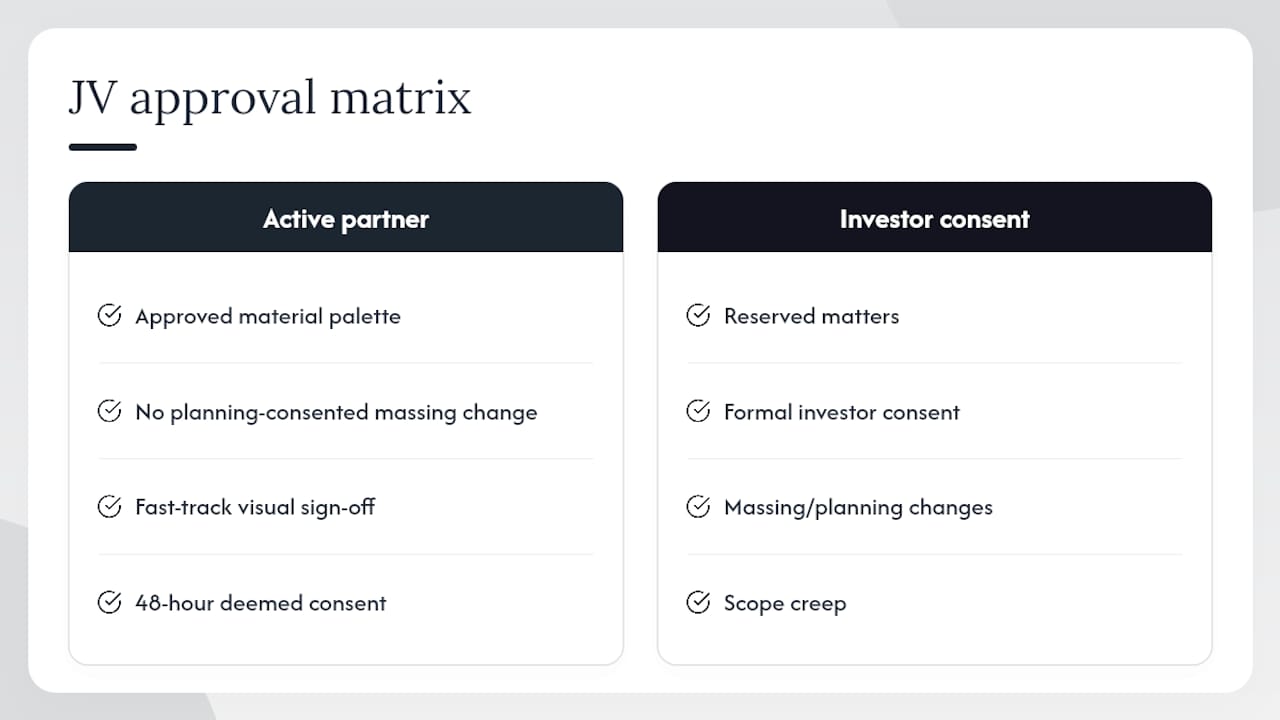
Deemed consent clauses are worth including: if a party does not respond within the stated response period, the change is treated as approved. This prevents a single partner from stalling execution by simply not engaging.
Version control and audit logs are the operational backbone. Every model iteration should carry a version number, a date stamp, and the name of the approving party. Cloud-based collaboration platforms with role-based access, such as those with identity management and reporting dashboards, enforce this automatically and reduce the risk of a partner working from a superseded file.
Pro Tip: Pre-agree a fast-track visual sign-off for any change that falls within the approved material palette and does not alter the planning-consented massing. A 48-hour deemed-consent window for these minor changes removes the most common source of day-to-day friction without exposing investors to uncontrolled scope creep.
Which tools and services should your JV team use, and when?
The right answer is almost always a hybrid: a contextual platform for feasibility, realtime engines for design iteration, and a managed studio for planning-ready and marketing outputs. No single tool covers all three stages well.
Here is how the main options map to JV workflow stages:
- Visualtrick: managed studio providing planning-ready CGI and photomontage for UK developers and architects. Best for planning submissions, investor packs and the full JV pipeline from massing to handover. Standout: UK planning experience and governed studio workflows that map directly to JV approval structures.
- VU.CITY: 3D city canvas platform for site appraisal, massing and contextual planning analysis. Imports consultant findings into a shared canvas with sunlight and overshadowing overlays. Best for feasibility and early-stage contextual decisions. Standout: city-wide data and geolocation tools that support planning submissions.
- Pixelspaces: realtime visualisation studio focused on embedding with design teams for fast, iterative outputs. Best for early design iterations where speed matters more than photorealism. Standout: collaborative working inside design studios rather than as a separate handoff.
- V-Ray: offline rendering engine producing photoreal stills for planning and marketing. Best for final planning photomontages and high-fidelity marketing imagery. Integrates with Revit, SketchUp and 3ds Max. No native multi-user collaboration, so version control must be managed externally.
- Enscape: realtime renderer with tight Revit and SketchUp integration. Best for rapid in-design walkthroughs and quick visual checks during design development. Standout: architects can run visual checks without leaving their authoring environment.
- Unreal Engine: realtime engine for interactive walkthroughs, VR and cinematic presentations. Best for investor experiences and immersive sales suite presentations. Requires specialist technical resource but delivers the highest interactivity. Supports interactive venue showcase formats that work well for stakeholder demos.
- Twinmotion: user-friendly realtime tool for quick massing visuals and early client demos. Best for rapid concept outputs where the team needs something presentable within hours. Lower technical barrier than Unreal Engine.
- Autodesk BIM 360: BIM collaboration and model management platform. Best for centralised Revit model storage, version control and multi-user access across JV partners. Standout: structured BIM workflows with permissioning and audit trails that satisfy JV governance requirements.
On integration: Enscape and V-Ray both import Revit and SketchUp models directly. Twinmotion accepts Revit via a live link. Unreal Engine requires a Datasmith export from Revit. BIM 360 holds the master model and feeds all of these.
IP and data security deserve explicit attention in JV agreements. The master model, all versioned outputs and the CGI asset library should be stored in a platform with role-based access control and audit logging. Agree at the outset which party owns the CGI assets on termination of the JV, and whether the CGI partner retains any licence to use imagery for portfolio purposes. These points belong in the JV operating agreement, not in a studio brief.
How to pick a CGI partner or platform for your JV
The single most important criterion is planning-readiness combined with governance integration: can the partner produce photomontages to UK planning standards, and can they work within your approval matrix without creating bottlenecks? Iteration speed is the second test.
Evaluation checklist:
- Planning experience: has the partner produced verified photomontages for UK local planning authorities? Ask for examples with geolocation methodology notes.
- BIM and model import: can they accept Revit, SketchUp or IFC files directly? What is their process for model updates?
- Version control: do they maintain a versioned asset library with audit logs? Who holds the master file?
- Iteration SLA: what is the committed turnaround for a minor revision versus a major scope change? Get this in writing.
- Security and IP: where are files stored? Who owns the assets on project completion or JV termination?
- Pricing model: per image, per package, or retainer for iterative updates? Retainer models suit active planning negotiations; per-image suits fixed-scope marketing campaigns.
Sample RFP questions:
- “Describe your geolocation and camera-match methodology for planning photomontages.”
- “How do you handle model version updates mid-project, and what is your turnaround SLA?”
- “What access controls and audit logging does your file management system provide?”
- “Can you share an example of a project where you worked within a client’s formal approval matrix?”
Red flags to watch for: no documented geolocation workflow; iteration SLAs measured in weeks rather than days; pricing that does not distinguish between minor revisions and scope changes; no clear answer on file ownership.
A short paid pilot is the most reliable procurement test: give the shortlisted partner a real model file and a defined brief, and measure iteration speed, output quality and how they handle a revision request. This proves integration with your BIM tools and whether their process fits your governance structure before you commit to a full retainer.
Typical UK timelines and cost ranges for CGI deliverables
Iterative retainer models compress timelines significantly compared to project-by-project commissioning, because the studio already holds the master model and understands the scheme. The first deliverable always takes longest; subsequent iterations are faster.
These are indicative ranges for UK studios in 2026; actual costs vary with scheme complexity, number of revision rounds and whether a retainer is in place. See pre-construction marketing visual examples for a broader sense of deliverable types and typical scopes.
Governance adds calendar time that teams consistently underestimate. A 10-working-day investor consent window on a planning-critical change, for example, can push a submission date by three weeks when factoring in the CGI partner’s production time after approval. Build approval windows explicitly into the programme, and use deemed-consent clauses to cap the exposure.
How one JV fixed deadlock by changing its CGI workflow
Changing the approval matrix and moving to a single source of truth reduced visual approval time and removed the most common source of partner friction on a mixed-use residential scheme.
The original problem was straightforward: two JV partners were each briefing the CGI studio separately, producing conflicting versions of the same elevation. The planning consultant received three different photomontages in a single submission window. The local planning authority requested clarification, adding eight weeks to the programme.
The fix involved three changes. First, the JV adopted a written limits-of-authority schedule for visual assets, designating one active partner as the sole point of contact with the CGI studio. Second, all model files moved to a shared BIM 360 environment with role-based access, so both partners always worked from the same versioned Revit model. Third, the CGI studio moved to a monthly retainer with a defined SLA for minor revisions, removing the need for a new purchase order every time a material specification changed.
The outcome: subsequent planning submissions carried consistent, geolocation-verified photomontages. Investor update packs drew from the same asset library. The approval round for the next planning application ran to programme.
The three actions any JV can copy immediately: (1) designate a single visual asset owner with written authority to approve minor changes; (2) move all model files to a shared, permissioned environment before the first CGI brief is issued; (3) agree a revision SLA with your CGI partner in writing, with deemed-consent timelines for each change class.
What studio teams actually need from JV clients on day one
The most common friction point when a CGI studio embeds into a JV workflow is not the technology. It is the absence of a single, authorised point of contact on the client side.

When a studio receives conflicting briefs from two partners, or when approval requests sit unanswered because neither partner is sure who owns the sign-off, the practical result is that the studio either waits or makes a judgement call. Neither is acceptable on a planning-critical deliverable. The governance structure needs to be in place before the first model file is shared, not after the first revision dispute.
Collaborative sessions work well when the architect, developer and studio lead are in the same room, or on the same call, at the point a new stage brief is issued. That single session, where the model is reviewed together and the brief is agreed live, eliminates most of the back-and-forth that inflates timelines. Remote delivery works for subsequent iterations once the brief is locked.
One realistic limitation: CGI can clarify design intent and support planning arguments, but it cannot resolve underlying disagreements between JV partners about the scheme itself. If two partners have not agreed on massing, specification or phasing, no amount of visualisation will substitute for that legal and commercial clarity. Ambiguity in roles and approval rights heightens the risk of execution stalls and costly disputes, and that is a governance problem that belongs in the JV agreement, not in the studio brief.
Visualtrick works with JV property teams from massing to handover
Visualtrick provides planning-ready CGI and governed visualisation workflows for UK joint venture property teams, covering every stage from initial massing studies through planning photomontage, marketing assets and as-built handover imagery.
The studio’s workflow maps directly to the governance structures JV teams need: a single point of contact, versioned asset delivery, and photomontages produced to UK local planning authority standards with full geolocation methodology. For teams running active planning negotiations, a retainer arrangement keeps the master model live and revision turnarounds predictable. For fixed-scope marketing campaigns, per-package pricing keeps costs clear.
A low-risk way to test the fit is a paid pilot: share a model file, agree a brief for one planning-ready view, and measure the output against your governance and quality requirements before committing to a full programme. Get in touch via the property CGI service page to discuss a pilot scope.
Sources
- Setting up successful joint ventures with institutional capital: 7 key considerations for asset managers – Mourant
- A Guide to Real Estate Joint Ventures for Sponsors
