
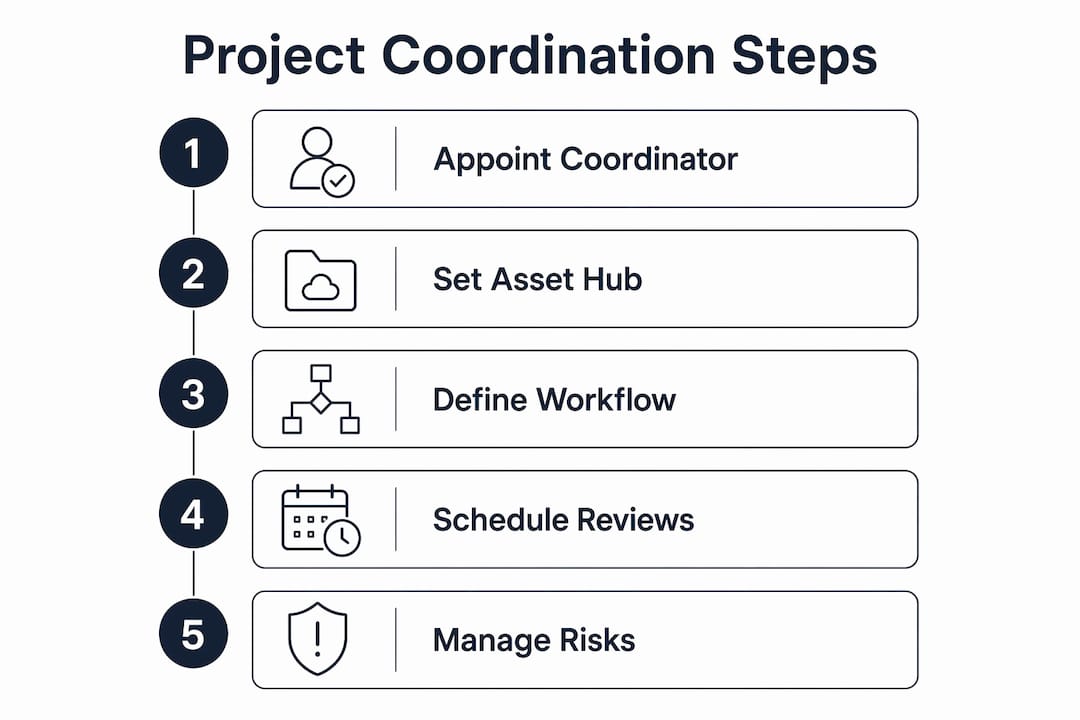
The single most effective way to coordinate visualisation and power team projects is this: appoint a named project coordinator and run every asset, approval, and brief through one central hub. That combination keeps planning-ready photomontages verified, aligns CGI delivery to planning permission windows and marketing launches, and cuts the costly re-renders that come from working across scattered email threads.
Three actions you can take today:
- Appoint one coordinator who owns the schedule, the asset folder, and stakeholder communications.
- Create a shared hub (cloud folder or project platform) with a locked folder for planning-ready files.
- Agree deliverable specs in writing before production starts, not during the first revision round.
Table of Contents
- Who does what on a high-end CGI project?
- How to set up a single source of truth for your project
- Which visual workflows actually work for property projects?
- Building a production schedule that fits planning and marketing timelines
- What to specify: planning-ready photomontages vs marketing renders
- How to run a review cycle that prevents late rework
- How to spot and escalate risks before they hit your deadline
- How Visualtrick coordinates a UK property project end to end
- Key takeaways
- What coordinated visualisation actually teaches you
- Visualtrick can coordinate your next CGI project
- Useful sources and further reading
Who does what on a high-end CGI project?
Clear role definitions are the foundation of any well-run visualisation project. Without them, review threads multiply, approvals stall, and the wrong version ends up in a planning submission.
Project coordinator: Owns the daily schedule, tracks CGI production milestones, manages the asset hub, and acts as the single point of contact between the CGI studio, architect, planning consultant, and client lead. Per Atlassian’s guidance on project coordination, the coordinator focuses on how and when delivery happens, leaving strategic decisions to the project manager or client lead.
Lead visualiser / CGI artist: Responsible for technical production quality, camera positions, lighting accuracy, and geometry. Signs off on internal QA before any draft leaves the studio.
Architect liaison: Provides updated drawings, confirms datum points, and approves that rendered geometry matches the current design intent.
Planning consultant: Reviews photomontages against verified survey data, confirms horizon and scale accuracy, and signs the verification statement for planning submissions.
Client lead: Makes commercial decisions, approves marketing renders, and gives final sign-off before files are locked.
Handover checklist for each stage:
- Confirm the correct drawing revision is in the hub before production starts.
- Record who approved each deliverable, the version number, and the date.
- Lock planning-ready assets immediately after verification; no further edits without a formal change request.
Pro Tip: Keep one review thread per deliverable. Mixing informal feedback with formal approvals in the same email chain is the fastest way to lose track of which comments are binding.
How to set up a single source of truth for your project
A central project hub prevents the most common and expensive mistake in CGI projects: two team members working from different drawing revisions. Every contract, hi-res asset, verified photomontage, and planning feedback letter lives in one place, with clear access rules.
Recommended folder structure:
| Folder | Contents | Access |
|---|---|---|
/01_Brief |
Signed brief, spec sheet, camera schedule | All team members (read) |
/02_Drawings |
Current architect drawings, revision log | Architect + coordinator (write) |
/03_Production |
WIP renders, draft CGIs | CGI team + coordinator |
/04_Planning-Ready |
Locked verified photomontages, metadata | Coordinator + planning consultant (write); others read-only) |
/05_Marketing |
Approved marketing stills, animations | Client lead + coordinator |
/06_Contracts |
Signed agreements, change requests | Coordinator + client lead |
File-naming convention: [ProjectCode]_[Deliverable]_[Version]_[Date] — for example, OAK24_PhotomontageNorth_v03_2026-03-14.tiff. Version numbers increment on every substantive change; the coordinator updates the revision log in /01_Brief each time.
Onboarding checklist for new team members:
- Share hub access link and explain folder permissions on day one.
- Walk through the naming convention with a live example file.
- Confirm they can locate the current brief, the latest drawing revision, and the sign-off log.
Which visual workflows actually work for property projects?
Visual project management integrates Kanban boards, Gantt charts, and shared calendars to make complex property development workflows visible. The key is matching the view to the project phase, not picking one tool and forcing everything through it.

| Phase | Best view | Why |
|---|---|---|
| Early design / brief | Kanban | Iterative; tasks move through stages as drawings evolve |
| Planning submission | Gantt / timeline | Fixed deadlines; dependencies between survey, production, and submission date |
| Marketing launch | Shared calendar | Deadline-driven; coordinates CGI handover with print and digital campaigns |
| Review and sign-off | Annotated review platform | Keeps comments version-specific and separate from formal approvals |
For small teams (two to four people), a shared folder plus a simple Kanban board in a tool such as Trello or Notion covers most needs. Larger, multi-discipline projects benefit from integrated project management platforms with timeline views, automated reminders, and dashboard reporting. The non-negotiable integration for any scale: file storage must connect directly to the review platform so annotated feedback always references the correct file version.
Pro Tip: Keep informal comments in the review platform and formal approvals in a separate sign-off log. Mixing the two creates ambiguity about which feedback is contractually binding.
Building a production schedule that fits planning and marketing timelines
Realistic lead times prevent the last-minute scrambles that force compromises on quality. The figures below reflect typical UK CGI project timings; complex or large-scale schemes will need more contingency.
| Milestone | Typical duration | Notes |
|---|---|---|
| Brief confirmed → site survey | 1–2 weeks | Dependent on site access and survey availability |
| Survey data → first draft CGI | 2–4 weeks | Longer for photomontages requiring verified survey |
| First draft → client-approved final | 1–3 weeks | Allows two revision rounds |
| Final CGI → planning submission | 1 week | Coordinator locks files and prepares submission pack |
| Final CGI → marketing handover | 2–3 days | File format conversion and resizing for digital/print |
Buffer rules:
- Add two weeks’ contingency for any project involving a verified photomontage, to allow for surveyor scheduling.
- Build in one extra revision round if the architect’s drawings are still at RIBA Stage 2 when briefing starts.
- Align the CGI sign-off deadline to at least three weeks before the planning submission date, not the day before.
What to specify: planning-ready photomontages vs marketing renders
The two deliverable types serve different audiences and carry different technical requirements. Conflating them in a brief is a reliable source of rework. CGI for planning applications demands verified geometry, accurate horizon lines, and metadata confirming the survey basis; marketing renders prioritise atmosphere, lighting quality, and lifestyle context.
| Deliverable | Format | Resolution | Key requirement |
|---|---|---|---|
| Verified photomontage | TIFF (layered) | — | Verified survey datum; horizon accuracy statement |
| Planning CGI (non-verified) | TIFF or high-res JPEG | — | Accurate geometry; matches approved drawings |
| Marketing exterior still | JPEG / PNG | — print; 72 dpi web | Lighting, landscaping, lifestyle context |
| Marketing interior render | JPEG / PNG | Material accuracy; furniture to spec | |
| Animation / walkthrough | MP4 | — | colour-graded master |
Spec template to paste into your brief:
- Camera positions: provide OS grid reference or agreed datum point for each view.
- Lighting reference: specify time of day, season, and sky condition (overcast / sunny).
- Context: confirm whether surrounding buildings are modelled from survey data or OS mapping.
- Layering: request layered TIFF for photomontages so the planning consultant can isolate the proposed building.
How to run a review cycle that prevents late rework
A structured approval loop stops the same comment appearing three rounds in. Visualising work reduces cognitive load and helps reviewers spot issues earlier, but only if the process channels feedback into the right stage.
The four-stage cycle:
- Draft review: CGI team shares a watermarked low-res draft. Reviewers annotate in the review platform. Coordinator collates and filters comments before passing to the CGI team.
- Technical verification: For photomontages, the planning consultant checks scale, horizon, shadow direction, and context accuracy against the verified survey. Any geometric discrepancy is flagged before client review.
- Client sign-off: Client lead reviews the approved-geometry version and signs the sign-off log (name, date, version number, any outstanding conditions).
- Lock and publish: Coordinator moves the signed-off file to the locked planning-ready or marketing folder. No further edits without a formal change request and a new version number.
QA checklist before any file leaves the studio:
- Scale confirmed against a known reference element (person, door, car).
- Shadow direction consistent with stated time of day and season.
- Horizon line matches verified survey data (photomontages only).
- Metadata embedded: project code, version, date, survey reference.
- File named to convention and placed in the correct hub folder.
Pro Tip: Never use the same document for review comments and formal sign-off. A separate sign-off log with a named approver and version number is the only record that holds up if a planning officer queries the submission.
How to spot and escalate risks before they hit your deadline
Proactive risk flagging saves budget on re-renders. The most common blockers in UK CGI projects are late site survey data, mid-production drawing revisions, delayed stakeholder sign-off, scope creep, and specification mismatches discovered at the verification stage.
A simple prioritisation rubric: rate each risk by impact (high / medium / low) and likelihood (likely / possible / unlikely). Any high-impact, likely risk triggers an immediate escalation to the client lead and a production pause until resolved.
Practical triggers:
- Pause production when drawing revisions arrive after geometry has been modelled. Continuing without updated drawings guarantees a re-render.
- Brief additional consultants when a photomontage view requires a new survey station not covered by the original survey scope.
- Add contingency when the planning submission date moves forward by more than two weeks, compressing the verification window.
Escalation template: flag the risk in writing to the client lead and coordinator, state the impact on the timeline, propose two resolution options, and request a decision within 48 hours.
How Visualtrick coordinates a UK property project end to end
A typical Visualtrick engagement runs from initial brief through to marketing handover in a structured sequence, with clear checkpoints at each stage.
Milestone timeline example:
| Week | Milestone | Deliverable |
|---|---|---|
| 1 | Brief confirmed; hub set up; spec agreed | Signed brief; folder structure live |
| 2–3 | Site survey and drawing review | Survey report; confirmed camera positions |
| 4 | CGI production: draft renders | Watermarked draft stills for review |
| 7 | Client and architect review round one | Annotated feedback; revision list |
| 8 | Revisions; photomontage verification | Verified photomontage; planning consultant sign-off |
| 10 | Final sign-off; files locked | Locked TIFF files; sign-off log complete |
| — | Marketing handover | JPEG/PNG exports; animation master |
Client process at each stage:
- Weeks 1–2: Client lead and architect confirm brief, drawings, and camera schedule.
- Weeks 4–7: Client lead reviews drafts via the review platform; architect confirms geometry.
- Week 9: Planning consultant verifies photomontages; coordinator prepares the submission pack.
- Week 10: Client lead gives final sign-off; coordinator locks assets and issues the marketing pack.
Visualtrick’s coordinator manages the hub, tracks every revision, and acts as the single point of contact throughout. The architectural CGI planning submission guide covers the full submission process in detail.
Key takeaways
Coordinating visualisation effectively requires a named coordinator, a single asset hub, and agreed specs before production starts — those three elements prevent the majority of re-renders and missed deadlines on UK property projects.
| Point | Details |
|---|---|
| Appoint a coordinator first | One named person owns the schedule, hub, and stakeholder communications from day one. |
| Lock planning-ready assets | Move verified photomontages to a read-only folder immediately after sign-off; no edits without a formal change request. |
| Match workflow to phase | Use Kanban for iterative design stages, Gantt for planning timelines, and a shared calendar for marketing deadlines. |
| Build in buffer time | Allow at least two weeks’ contingency for verified photomontage projects to cover surveyor scheduling. |
| Visualtrick as your coordinator | Visualtrick manages the hub, production schedule, and verification process for UK planning and marketing CGI projects. |
What coordinated visualisation actually teaches you
The conventional wisdom is that CGI projects run late because of the CGI studio. In practice, the delay almost always originates upstream: a drawing revision that arrives after geometry is modelled, a planning consultant who was not briefed on the verification requirement until week eight, or a client lead who conflated informal feedback with formal sign-off.
The real lesson from delivering planning-ready visualisation across UK property projects is that the coordinator role is not administrative support. It is the function that keeps the technical team, the planning consultant, and the client commercially aligned. When that role is absent or under-resourced, every other part of the process degrades: the CGI team produces work against an outdated brief, the planning consultant receives files that cannot be verified, and the marketing team launches with assets that were never formally approved.
There is also a persistent misconception that verified photomontages and marketing renders are interchangeable. They are not. A photomontage produced without a verified survey datum is not planning-ready, regardless of how photorealistic it looks. Getting that distinction wrong at brief stage costs two to four weeks of re-work at the worst possible point in the programme.
The strategic value of coordinated visualisation is straightforward: a project that moves from planning permission to marketing launch with the same verified asset base, managed through a single hub, is faster, cheaper, and more defensible than one that treats planning and marketing as separate commissions.
Visualtrick can coordinate your next CGI project
Visualtrick delivers architectural visualisation services for UK property developers, architects, planners, and estate agents, covering everything from verified photomontages for planning submissions to marketing-grade CGI and animations for sales campaigns. The process is project-based, with a dedicated coordinator managing the hub, timeline, and sign-off cycle from brief to handover.
Whether you are preparing a planning application, launching an off-plan sales campaign, or need CGI for architects at design development stage, the first conversation covers your timeline, brief, and budget. Get in touch with Visualtrick to start that conversation and receive a clear production schedule before any work begins.
Useful sources and further reading
The sources below underpin the guidance in this article and are worth bookmarking for ongoing reference.
| Source | What to use it for |
|---|---|
| PMI: Visual project management | Justifying visual-first communication with planning committees and mixed stakeholder groups |
| Atlassian: Project coordination | Coordinator role definition, risk flagging, and single source of truth principles |
| Asana: Visual project management | Choosing between Kanban, Gantt, and calendar views by project phase |
| Miro: Visual project management | Understanding which visual view suits iterative vs deadline-driven stages |
| Wrike: Project coordination | Selecting integrated platforms with timeline and automation features |
| Indeed: Project coordination | Coordinator responsibilities and SMART goal-setting for milestone tracking |
| Visualtrick: CGI for planning applications | Verified photomontage standards and planning submission requirements |
| Visualtrick: Planning submission guide | Step-by-step process for CGI-supported planning submissions in the UK |
- TimeProf: Workforce management tools checklist — useful for evaluating graphical workflow tools and governance frameworks for creative production teams.
- Olex Digital: Infographics and data visuals — reference for producing concise visual assets that support stakeholder communication and decision-making.
