
Garden design CGI is photorealistic 3D visualisation that turns a landscape plan into a lifelike image or animation before a single spade goes into the ground. It lets homeowners and garden designers test layout, materials, lighting and planting choices on screen, catching costly mistakes early. Anyone spending serious money on a garden rebuild, or seeking planning approval, benefits from seeing it rendered first.
TL;DR:
- CGI renderings accurately show lighting, materials, and scale, reducing costly mistakes before construction begins.
- Deliverables vary from still images to full animations, with costs mainly based on angles, complexity, and revision rounds.
- Proper site data and detailed briefs significantly improve accuracy and reduce project timelines and costs.
- CGI is most effective for client approvals, planning submissions, and marketing, but does not replace technical construction plans.
- Experienced studios with landscape-specific portfolios and survey capability ensure more convincing, planning-compliant visuals.
Table of Contents
- What garden design CGI shows and why it pays off
- What deliverables can a garden CGI studio produce?
- How do you commission garden design CGI?
- What to supply, how long it takes, and how pricing works
- Where garden CGI works best, and where it has limits
- Why choose Visual Trick for garden CGI?
- What software and technology power garden design CGI?
- How should you review and give feedback on garden CGI?
- How do you choose the right CGI provider for a garden project?
- What the CGI hype gets wrong
- Ready to commission your garden CGI? Here’s how to start
- Sources
- FAQ
What garden design CGI shows and why it pays off
A CGI render shows exactly how a garden will look once built, not an artist’s impression. That distinction matters when you’re deciding between a sandstone patio and a porcelain one, or checking whether a new pergola blocks the neighbour’s view into next door.
Garden studios use CGI to convey mood, atmosphere and mature planting, not just hard landscaping. That’s a different job to a 2D plan, which can’t show you how evening light will hit a seating area in July or how a border will read once the grasses fill out over three seasons.
The practical benefits stack up quickly:
- Layout and scale checks — spotting a path that’s too narrow or a terrace that crowds the boundary fence, before groundwork starts
- Material and lighting tests — comparing stone finishes, decking tones, or how a space feels lit at dusk versus midday
- Faster sign-off — clients, contractors and planning consultees agree a direction quicker when they can see it, not just read it
- Fewer variation orders — decisions locked in at the design stage mean fewer expensive changes once contractors are on site
Garden-design studios increasingly treat CGI as a core communication tool for exactly this reason: it moves conversations from guesswork to agreement.
What deliverables can a garden CGI studio produce?
Not every project needs the same output. A single still image answers a different question than a walkthrough does, and knowing which one you need saves money.
- Photoreal stills — the workhorse format, used to settle material, planting and composition decisions for a specific view
- Walkthroughs and animations — show how someone moves through the space, useful when sequencing (arrival, transition zones, destination points) matters more than any single frame
- 360° panoramas and web viewers — let a client explore several vantage points from one scene, handy for gardens with more than one seating or activity area
- Interactive or VR scenes — reserved for larger schemes or high-value marketing pitches where genuine immersion changes the decision
- Seasonal and lighting variants — the same garden rendered in spring planting versus five-year maturity, or daylight versus evening, to test how it ages
Specialist studios routinely offer this full range as standard deliverable types, and residential CGI providers commonly package stills, 360° views and walkthrough video together for exactly this reason, supporting their architecture clients with Architecture SEO Services to help win better projects. Choosing the right mix upfront, rather than adding formats later, is usually the cheaper route.
How do you commission garden design CGI?
Commissioning CGI follows a fairly predictable sequence, whether you’re a homeowner working with a designer or a garden designer briefing a visualisation studio directly.
- Write a short brief. Specify which views matter most, any style references (a particular finish, a competitor image you like), and which deliverables you actually need.
- Supply site inputs. A measured plan, level data and site photographs give the studio the accuracy it needs. If you don’t have a CAD file, a hand-drawn plan with photos and rough dimensions can substitute, though it usually adds a review round.
- Modelling and first drafts. The studio builds a 3D model, then produces initial draft renders for your review.
- Review rounds. Most studios build in two rounds of feedback as standard; more adds time and, often, cost.
- Final delivery. Expect formats such as JPEG or TIFF stills, MP4 animations, or interactive web viewers, and clarify usage rights upfront if the images will appear in marketing.
Turnaround varies with scope: a small residential still might take one to two weeks from a clean brief, while an animation or a multi-view commission for a larger scheme can run several weeks.
Pro Tip: Send reference photos of gardens you like alongside your brief, not just written descriptions. Studios interpret “Mediterranean planting” very differently without a visual anchor.
Studios such as Visual Trick’s architectural visualisation team work this brief-to-delivery process routinely across both residential gardens and larger landscape schemes.
What to supply, how long it takes, and how pricing works
Before you request a quote, it helps to know what a studio will ask for and roughly how the numbers shape up.
You’ll typically need to supply:
- A measured plan or survey, ideally with levels
- Photographs of the existing site from the angles you want rendered
- Any material samples, product specifications or planting notes
- A rough indication of your preferred camera views
A realistic schedule runs from survey through modelling, two review rounds, and final images, often spanning several weeks depending on the number of views and revisions requested. Pricing shapes tend to follow the deliverable, not a flat rate: studios often quote per image, per view package (a set of angles from one garden), with animation or VR treated as add-ons rather than included by default. The cost depends mainly on the number of camera angles, the complexity of planting and hardscaping, and how many revision rounds are needed.
If budget is tight, you can trim cost without abandoning the exercise: request fewer camera angles, ask for a more schematic model rather than full material accuracy, or phase delivery so you commission the highest-priority views first and add others later.
Where garden CGI works best, and where it has limits
CGI earns its place at three points in a project: getting a client to say yes, strengthening a planning submission, and selling a scheme to investors or a wider market. It’s less useful, on its own, for anything requiring buildable accuracy.
- Client approvals — a rendered garden settles disagreements over material or layout faster than a sketch or a swatch board ever will
- Planning submissions — photorealistic landscape CGI is regularly used to support planning applications in the UK, particularly when paired with technical viewpoint references and sun-position data
- Marketing and tender packs — a strong render sells a scheme to buyers or investors before the garden exists
Where CGI falls short is anywhere a builder needs exact buildability data. It is not a substitute for construction drawings, planting schedules, or drainage design, and it never replaces a structural or drainage consultant’s sign-off. The sensible approach pairs a render with the technical plans behind it, using planning-grade visuals alongside the paperwork planners actually assess line by line.
Why choose Visual Trick for garden CGI?
Visual Trick provides high-end CGI, visualisation and 3D rendering for property developers, planners, planning consultants, architects, interior designers, garden designers, estate agents and exhibitors, supporting everything from planning permission applications to marketing campaigns and investor pitches.
What that means in practice for a garden project:
- Clean, realistic visuals built to be planning-ready, with the technical clarity consultees expect
- Delivery across the UK and internationally, with understanding of local planning conventions and international marketing standards
- Specialised workflows for design communication, including CGI services built for interior and design professionals who need imagery that reads clearly to clients and committees alike
- The capability to cover both the garden and the building it sits alongside, useful when a project needs consistent visual language across both
What software and technology power garden design CGI?
Studios typically build garden scenes in industry-standard 3D packages such as 3ds Max, SketchUp, or Lumion, layering in specialist vegetation libraries so planting reads as real species rather than generic green blobs. Rendering engines like V-Ray or Corona handle the lighting and material physics, which is why a well-produced still can show how afternoon sun genuinely falls across a terrace.
Terrain and levels data usually comes from CAD or, increasingly, from drone or laser survey capture, giving the model accurate ground contours rather than an estimated slope. That accuracy matters more for gardens than for buildings, since level changes, retaining walls and drainage falls are often the trickiest part of a scheme to get right on paper.
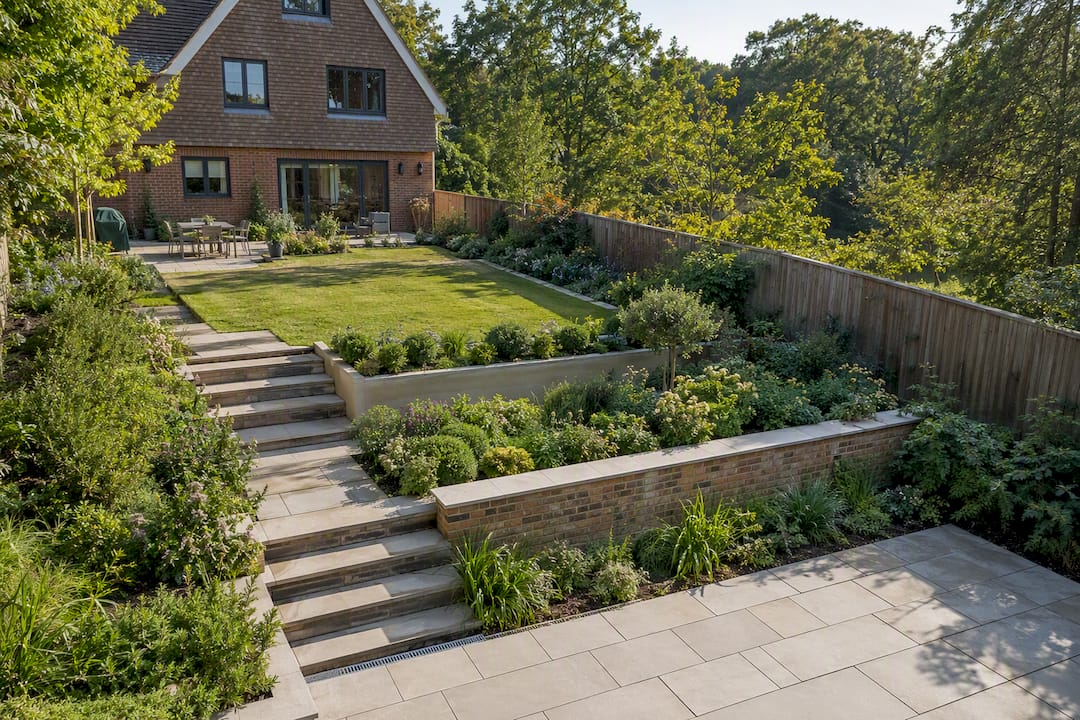
A newer category worth understanding is AI-assisted rendering, which can generate an image from a CAD screenshot or even a rough sketch in minutes. Tools in this space can turn a plan into a visual very quickly, which is genuinely useful for early-stage concept testing. The trade-off is accuracy: AI-generated renders speed up exploration but don’t yet guarantee the planning-grade precision a studio-led workflow delivers, particularly around viewpoint geometry and material fidelity. For a quick mood check, AI tools have a role. For anything going to a planning committee or a paying client, a studio workflow with a verified viewpoint and sun-position data is the safer route.
How should you review and give feedback on garden CGI?
The most useful feedback is specific, not general. “I don’t like it” gives a studio nothing to act on. “Move the camera two metres left so the pergola doesn’t block the lawn” gets you a usable second draft.
When reviewing a first-draft render, check these things in order:
- Geometry first. Does the layout, scale and proportion match what you expect from the plan? This is the cheapest thing to fix early and the most expensive to fix late.
- Materials second. Is the paving tone, decking finish or wall cladding close to what you specified, or does it need a swap?
- Planting third. Does the vegetation look plausible for the species and maturity you asked for? Flag anything that looks generic rather than specific.
- Lighting and atmosphere last. This is often the easiest adjustment, so leave it until the bigger structural elements are locked.
Most studios build two review rounds into a standard project, so use the first round for structural and material changes, and save the second for finer detail like planting density or shadow tone. Bundling feedback into clear, numbered points rather than a stream-of-consciousness email speeds up turnaround noticeably, since the studio isn’t left guessing which comment applies to which part of the image.
How do you choose the right CGI provider for a garden project?
Not every visualisation studio understands gardens the way it understands buildings. Planting, seasonal change and soft landscaping behave differently to brick and glass, and a provider whose portfolio is all interiors and building exteriors may not have the plant libraries or landscape experience to make a garden convincing.
Look for a portfolio with actual garden and landscape work in it, not just architecture with a lawn in the background. Ask whether the studio can supply technical viewpoint notes if the images are heading to a planning application, since not every visualisation provider works to that standard. Check what’s included in the quoted price: is a review round built in, or charged separately? Are seasonal variants or an evening lighting version an add-on?
It’s also worth asking how the studio handles missing survey data. Projects without a full CAD survey are common among homeowners, and a provider who can work confidently from photos and rough measurements, flagging where accuracy is estimated rather than exact, is more useful than one who insists on data you don’t have. Finally, a body like the Society of Garden Landscape Designers is a sensible starting point if you’re looking for a registered garden designer who already works with CGI as part of their process, rather than sourcing the visualisation separately.
What the CGI hype gets wrong
The conventional pitch for garden CGI oversells the “wow” factor and undersells the decision-making value. A beautiful render that nobody interrogates properly is just an expensive picture. The real return comes from using CGI to force decisions earlier, when they’re cheap to change, rather than mid-build, when they’re not.
Where most guides fall short is timelines. Homeowners often assume a render is a same-week turnaround because AI tools have set that expectation. A studio-led project with proper survey data, planning-grade accuracy and two review rounds simply takes longer, and that’s not a flaw, it’s the cost of the image actually matching what gets built.
If you take one thing from this, prioritise the brief over the software. A vague brief produces a vague first draft, however good the rendering engine is. Spend the extra hour writing down exact views, reference images and must-have materials before you send anything to a studio. That single step does more for the final result than any choice between AI tools and traditional rendering ever will.
— Paride
Ready to commission your garden CGI? Here’s how to start
CGI providers typically work project by project, allowing you to send the plan, photos and a short description of what you want to see, and then scope the work from there rather than pushing you through a generic package.
To get a fast, accurate quote, include a measured plan or survey if you have one, current site photographs, and a note on which deliverables matter most, whether that’s a single hero still for a planning submission or a walkthrough for a client pitch. The more specific the brief, the fewer review rounds you’ll need. Visit Visual Trick’s 3D rendering services page to request an initial estimate, or start with a brief review if you’re not yet sure which deliverables your project needs.
Sources
Sources cited above cover planning-grade rendering standards, deliverable types, and AI-assisted workflows, plus the Society of Garden Landscape Designers for finding registered designers who commonly commission CGI.
- RENDERCAD for Landscape Architects | Landscape Architecture Visualization
- 3D CGI Garden Design Visualisation | Tim Miller Design
- CGI Landscape Design & Visualisation | Castle Rock Landscapes Bracknell
- SGD / professional garden design body
FAQ
Can AI design my garden for free?
Free AI tools can generate a rough visual from a sketch or photo, useful for early mood exploration, but they don’t offer the planning-grade accuracy or technical viewpoint data a studio provides.
What is the hourly rate for a garden designer?
Rates vary widely by region and experience, and most garden designers price by project or day rate rather than a fixed hourly figure, so it’s best to request a quote based on your specific brief.
What are the golden rules for garden design?
Common principles include respecting scale and proportion, creating clear sightlines, using materials that suit the setting, and planning for seasonal change. Definitions of a fixed “rule list” vary between designers, so treat these as guiding principles rather than a formal standard.
Can ChatGPT design my garden?
ChatGPT can suggest planting combinations, layout ideas, or style references in text form, but it cannot produce a measured, photorealistic visual of your actual site the way studio-produced CGI can.
How long does garden CGI take to produce?
A small residential still typically takes one to two weeks from a complete brief and survey data, while animations or multi-view commissions for larger schemes usually take several weeks longer.
