
Insist on three file categories from any CGI studio: multichannel OpenEXR for compositing and colour grading, a native or FBX file with full textures and UVs for future edits, and a GLB or USDZ export for web and AR presentation. Everything else, from PNG previews to STL prints, sits underneath those three. Ask for these by name in your brief and you avoid the rework that swallows most CGI project budgets.
TL;DR:
- Request native or FBX files with full textures and UVs for future edits, alongside high-quality EXR masters for compositing and color grading.
- Use OpenEXR format for compositing, TIFF for print, PNG for transparent previews, JPEG for quick review, and HDR for environment maps, with storage scaled to output size.
- Prefer glTF or GLB for web and AR presentations, and USDZ for iOS, but always verify the exporter version to prevent compatibility issues.
- Clearly specify delivery files, revision limits, and licensing terms upfront in a detailed brief to prevent misunderstandings and reduce rework.
- Archive all source, master, and preview files with checksums and retain these for at least two years, moving outdated files to cold storage to ensure future accessibility.
Table of Contents
- Image output formats: when to ask for EXR, TIFF, PNG, HDR and JPEG
- 3D and scene formats: OBJ, FBX, glTF/GLB, USD/USDZ, STL and 3MF explained
- A commissioning brief and delivery checklist you can copy
- Delivery, archiving and licensing: naming, backups and a sensible retention policy
- Conversion and workflow pitfalls: what regularly breaks and how to avoid it
- How Visual Trick specifies handover to reduce rework
- Getting your next CGI project delivered the right way
- Sources
Image output formats: when to ask for EXR, TIFF, PNG, HDR and JPEG
Every CGI project produces images at different stages, and each stage needs a different file type. Get this wrong and you either pay for re-renders or hand a marketing team a file they can’t retouch.
OpenEXR (.exr) is the format compositors actually want. It stores high bit depth data across multiple channels, which means a retoucher can adjust exposure, colour and shadow detail after the render without artefacts. Render pipelines such as V-Ray recommend multichannel EXR for compositing, precisely because it keeps render elements (reflections, shadows, ambient occlusion) separate rather than baked into a flat image.
Some studios go further and supply deep EXR, which records multiple depth samples per pixel. You rarely need this for a standard planning or marketing image; it earns its place mainly in complex animation or VFX work with heavy overlapping geometry.
For everything else, simpler formats do the job:
- TIFF for print deliverables, including 32-bit variants when a printer demands full dynamic range.
- PNG for lossless previews that need transparency, such as a building cut-out over a background photograph.
- JPEG for quick review images where file size matters more than pixel-perfect fidelity.
- HDR (.hdr/.rgbe) for environment maps used in lighting workflows, typically only relevant if you’re managing part of the render pipeline yourself.
Statistic to remember: aim for GLB and web assets in the tens of megabytes, but your EXR masters and TIFF print files will run far larger. Budget storage accordingly rather than being surprised by it later.
The practical request is simple: ask for the EXR master alongside a flattened 16-bit or 8-bit PNG or TIFF sized to your actual output, whether that’s an A1 planning board or a web banner.
3D and scene formats: OBJ, FBX, glTF/GLB, USD/USDZ, STL and 3MF explained
Image formats cover the finished render. 3D formats cover the model itself, and picking the wrong one is how projects lose cameras, materials or entire scenes during handover.
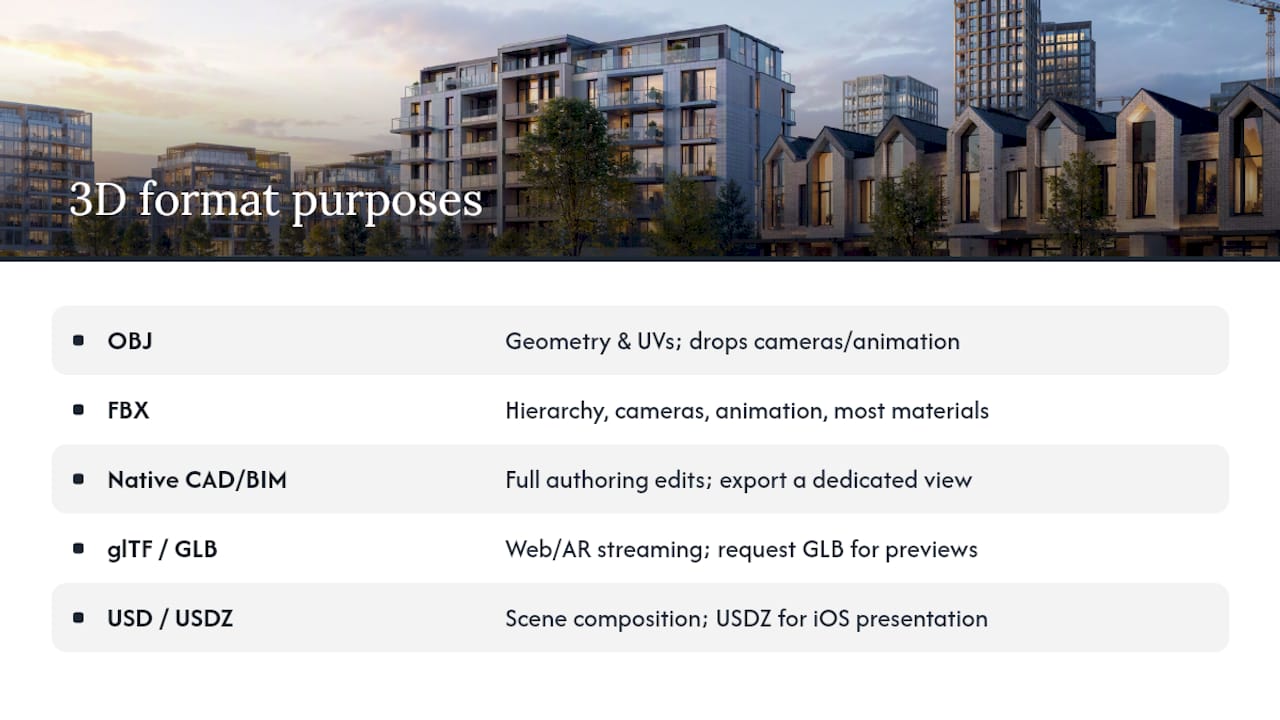
OBJ is the oldest and most universally supported geometry format. Every 3D package reads it. The catch: OBJ carries geometry and UV coordinates but drops cameras, lights and animation, so it’s fine for a single static asset but useless if you expect to receive a working scene.
FBX solves that gap. It carries hierarchy, cameras, animation and most material parameters, which makes it the preferred format for editable exchange between design software such as 3ds Max, Cinema 4D or Blender.
Native CAD/BIM files (Revit, Rhino, SketchUp) matter when you expect further authoring edits down the line. Ask the studio to export a dedicated view rather than the whole model, since hiding non-essential categories such as grids and MEP layers before export avoids a messy, oversized file arriving in your inbox.
glTF/GLB is the format built for the web and AR, and it now carries genuine institutional weight. Khronos maintains glTF as a royalty-free specification recognised by ISO/IEC, and geospatial standards such as OGC’s 3D Tiles specification use glTF 2.0 as the primary tile format for streaming large models. Request GLB for interactive web previews.
USD/USDZ handles scene composition and packaging for more complex pipelines. USDZ bundles a USD stage with its referenced assets into a single archive so apps can display it without unpacking a filesystem, which is exactly why Apple’s AR Quick Look uses it. Request USDZ specifically for iOS presentation.
STL and 3MF exist for one purpose: 3D printing physical models. Request them only if you actually need a printed maquette.
Pro Tip: Ask which glTF or FBX exporter version the studio used. Older exporters handle PBR materials and axis orientation differently, and a mismatch is the single most common reason a “working” file opens broken on your end.
A commissioning brief and delivery checklist you can copy
Most disputes over CGI delivery come down to one thing: nobody wrote down what “finished” meant. A brief that names exact files removes the ambiguity.
- Planning pack: EXR master, high-resolution PNG or TIFF for the application document, and reference camera data matching the approved viewpoints. See our guidance on planning-ready CGI deliverables for what planning officers typically expect.
- Marketing pack: EXR master plus 4K TIFF or JPEG for brochures and a web-optimised GLB for interactive site embeds.
- Editable source pack: the native authoring file plus FBX or OBJ, with all textures and UVs included, not referenced externally.
- Folder and filename structure: a convention such as
projectcode_stage_date_v01.extavoids the classic “final_final_v3” chaos. - A manifest document: list every file, its resolution, any licensed third-party textures used, and the licence terms attached to them.
- Acceptance criteria: agree the number of included revisions upfront, in writing, before the first render goes out.
Pro Tip: Put the manifest requirement in the contract, not just the brief. A one-page list of files and licences takes a studio ten minutes to produce and saves you weeks of chasing missing textures eighteen months later.
Delivery, archiving and licensing: naming, backups and a sensible retention policy
Handover isn’t the end of the file’s life. Developments get resold, marketing gets reused, and planning conditions get revisited years later, so archiving discipline matters as much as the render itself.
Keep both the flattened client-facing deliverables and the original source files. Store a lightweight GLB alongside them purely for quick previews, and file a manifest with checksums so nobody has to guess whether a texture pack is complete.
A sensible baseline is to retain everything for the life of the active project plus two years, then move it to labelled cold storage rather than deleting it outright. Mark superseded renders clearly as deprecated so nobody accidentally pulls an outdated elevation into a new brochure.
| Retention stage | What to keep | Format |
|---|---|---|
| Active project | Source files, EXR masters, manifest | Native + FBX/OBJ + EXR |
| Handover | Flattened deliverables, GLB preview | PNG/TIFF/JPEG + GLB |
| Long-term archive | Full pack plus checksums | All of the above, compressed |
Before you sign off, confirm the licensing terms: what uses are permitted, whether sublicensing to a third party (an agent, a housebuilder’s own marketing team) is allowed, and whether any stock or third-party textures carry restrictions that outlive the project itself.
Conversion and workflow pitfalls: what regularly breaks and how to avoid it
Most CGI handover problems trace back to the same handful of causes, and all of them are avoidable if you ask the right question before the files land.
- OBJ drops scene state entirely, so if you receive one, request an accompanying materials list and camera specification alongside it.
- FBX exporter settings vary between software versions and can change texture embedding or flip the model’s axis orientation, so ask which exporter and version the studio used and open a test file before final delivery.
- glTF and GLB bake some material nodes for portability, and export matrices confirm GLB exports baked materials and textures rather than editable definitions, so ask whether Draco compression was applied and whether that baking will block future edits.
- Colour management causes more silent errors than any other issue: insist on a linear workflow and ask for written notes on the scene’s colour space and the EXR bit depth used.
- Keep both a baked GLB for web and AR, and a non-baked native or FBX file for anything you might need to edit later. Losing the editable version to save storage space is a false economy.
Pro Tip: If a render looks slightly “off” in colour after conversion, check the colour space mismatch first. It is the most common and most overlooked cause of CGI files that “don’t match the original” after handover.
How Visual Trick specifies handover to reduce rework
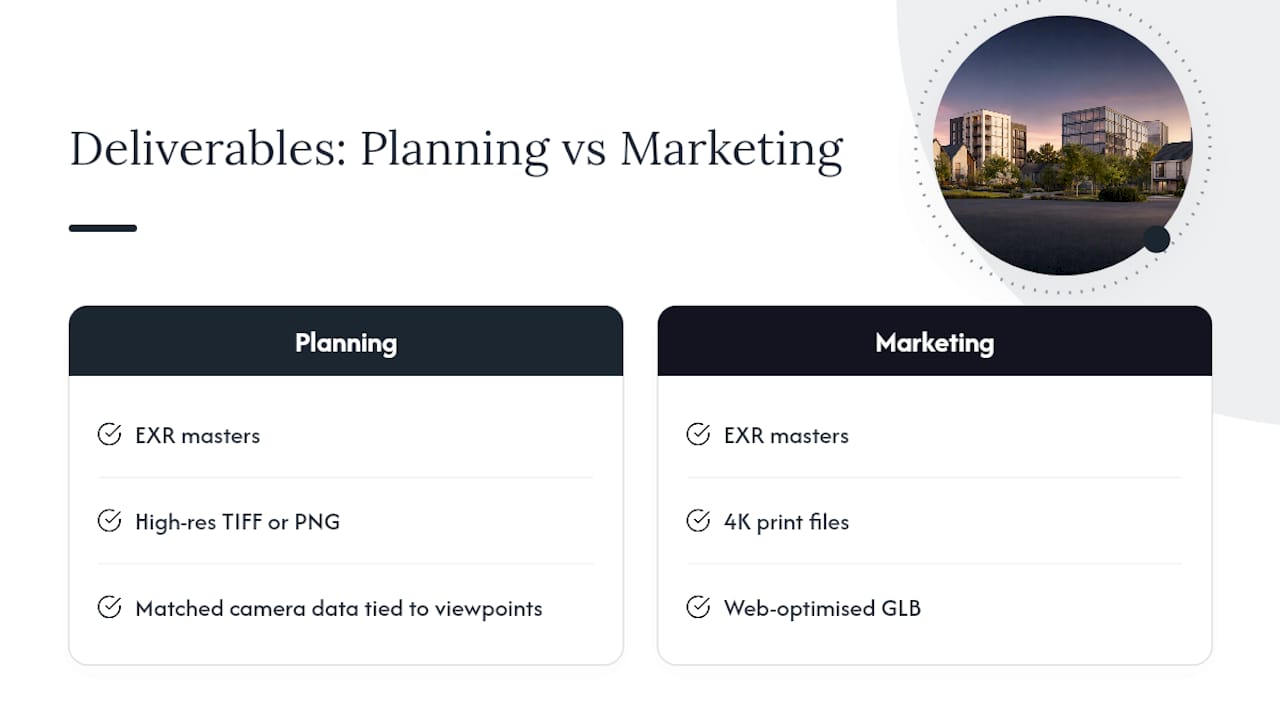
Planning-ready and marketing-ready CGI deliverables typically include the categories covered above rather than a single “finished image” export. For a planning application, that typically means EXR masters, high-resolution TIFF or PNG for the submission document, and matched camera data tied to the approved viewpoints. For a marketing campaign, it means the same EXR masters alongside 4K print files and a web-optimised GLB for interactive use on a property developer’s website.
The pattern holds regardless of project type: separate the file that gets retouched from the file that gets shown, and never let one stand in for the other.
— Paride
Getting your next CGI project delivered the right way
Chasing down a missing texture pack or a broken FBX export six months after a project closes costs more time than specifying the file pack correctly from day one. A full delivery pack on request includes EXR masters for compositing, layered native files for future edits, and GLB or USDZ exports ready for web and AR presentation, all supplied with a manifest so nothing gets lost at handover.
Whether you’re preparing a planning submission or briefing a marketing campaign for a live development, our architectural visualisation services cover the full delivery pack from first render to final archive. If you’re weighing up export options for your own asset library, this guide to preparing 3D models for distribution is a useful primer on clean authoring practice before you brief a studio at all. Send us your project details and we’ll confirm exactly which files you’ll receive, and when.
